
Download TikTok MP3
Use our TikTok MP3 downloader to convert TikTok videos into audio files online. Paste the link, extract the sound, and download TikTok audio in seconds.
In 2026, TikTok sounds, voice clips, and short audio trends are used everywhere – from personal edits to social media projects. Our tool helps you download TikTok MP3 audio from a video link quickly and easily, without installing an app.
How to Download TikTok MP3
Downloading TikTok audio is simple and quick. Just copy the TikTok video link, paste it into the search box, view the video details, and save the audio file to your device in MP3 format.
Step 1
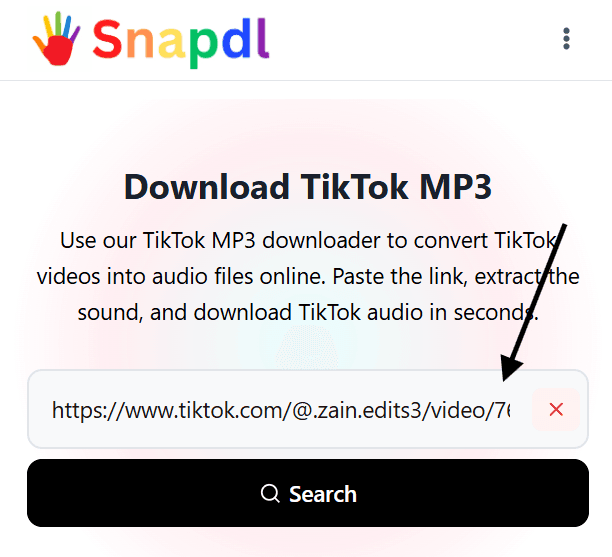
Enter Video URL
Paste the TikTok video URL into the search box. Make sure the link is correct so the tool can find the video and extract its audio.
Step 2
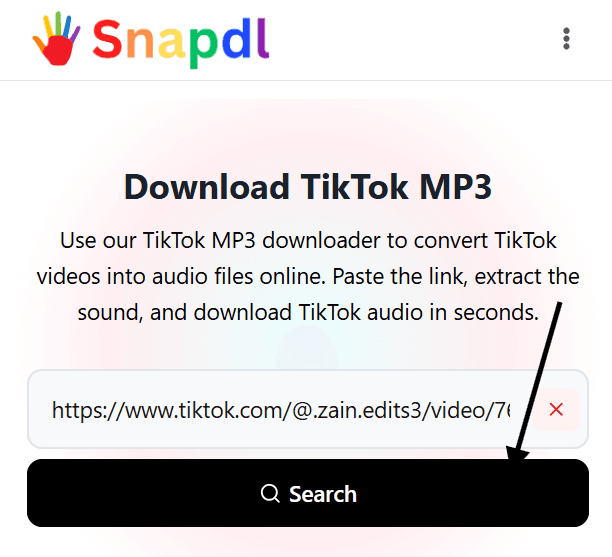
Click Search Button to View the Details
Click the search button after entering the video link. The tool will process the URL and show the available details before downloading.
Step 3
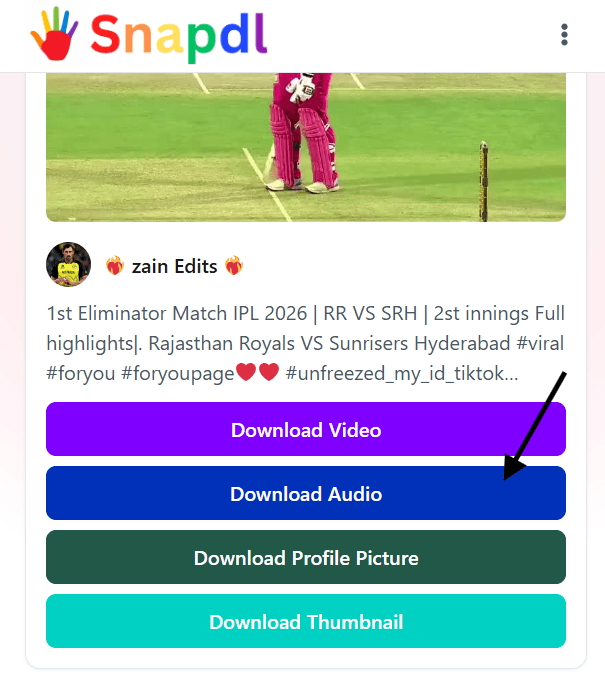
Click on Download Audio Button
Once the details appear, click the Download Audio button to download the TikTok MP3 file directly to your mobile, tablet, or desktop.
Best TikTok to MP3 Converter Online
Our TikTok to MP3 converter online helps you turn TikTok videos into clean audio files without installing any app or software. Simply paste the TikTok video link, search for the video details, and download the audio in MP3 format within seconds.
Whether you want to save a TikTok sound, voice clip, background music, or audio from your own video, this tool makes the process easy on mobile, tablet, and desktop. It is designed for quick access, simple use, and smooth downloading directly from your browser.
For best results, always use a valid TikTok video URL and make sure you have permission to download or reuse the audio. Respect the original creator’s rights and use downloaded TikTok MP3 files responsibly.
More TikTok Tools: TikTok PP Downloader
Download TikTok Audio from Any Device
You can download TikTok audio from any device using our online TikTok MP3 downloader by Snapdl. Whether you are using an Android phone, iPhone, tablet, laptop, or desktop computer, the process stays simple and fast. Just copy the TikTok video link, paste it into the search box, and download the audio file directly from your browser.
There is no need to install an app, extension, or extra software. The tool works online, so you can save TikTok sounds, voice clips, music, or audio from videos whenever you need them. For the best experience, use a valid TikTok video URL and make sure your internet connection is stable.
This makes it easy for users to download TikTok MP3 files on mobile or desktop while keeping the process quick, clean, and user-friendly.
Viral Tool: Reddit Viewer
Key Features of Our TikTok MP3 Downloader
Fast TikTok MP3 Download
Download TikTok MP3 audio quickly by pasting your video URL and clicking the download button.
Online TikTok to MP3 Converter
Convert TikTok to MP3 directly from your browser without installing any app or software.
Download TikTok Audio on Any Device
Use the tool on mobile, tablet, laptop, or desktop. It works smoothly across different devices and browsers.
Save TikTok Sounds as MP3
Download TikTok sounds, voice clips, background music, and audio from video links in MP3 format.
Simple and User-Friendly Tool
The process is easy: paste the TikTok video URL, search for details, and click the download audio button.
No App Installation Required
Use the TikTok audio downloader online without downloading extra apps, extensions, or complicated software.
TikTok Music Downloader for Personal Use
Our TikTok music downloader helps you save audio from TikTok videos for personal use in a simple and convenient way. You can paste a TikTok video link, extract the sound, and download the audio file directly to your device without installing extra software.
This is useful when you want to save your own TikTok audio, collect sounds for offline listening, or keep a voice clip, background sound, or music track for personal reference. The tool works online, so you can use it on mobile, tablet, laptop, or desktop.
Please use downloaded TikTok music responsibly. Only download or reuse audio when you own the content, have permission from the creator, or the content is allowed for personal use. Always respect TikTok creators, copyright rules, and platform guidelines.
More Tools: Anonymous Snapchat Viewer
Who Uses a TikTok MP3 Downloader?
A TikTok MP3 downloader can be useful for different types of users who want to save TikTok audio for personal, creative, or reference purposes. Here are some common users:
Content Creators
Content creators use TikTok audio download tools to save trending sounds, voice clips, or background audio for inspiration and content planning.
Social Media Managers
Social media managers may use a TikTok MP3 downloader to collect audio references, study trending sounds, and plan short-form video campaigns.
Video Editors
Video editors often need audio clips for editing practice, personal projects, or organizing sound ideas before creating new videos.
Students and Researchers
Students or digital media researchers may download TikTok audio to study trends, sound usage, online culture, or social media behavior.
Music and Sound Lovers
Some users simply want to save TikTok sounds, music clips, or voice audio for personal listening or offline reference.
TikTok Users Saving Their Own Audio
Many TikTok users use a TikTok MP3 downloader to download audio from their own uploaded videos, especially when they want to keep a copy on their device.
Marketers and Trend Analysts
Marketers may use TikTok audio download tools to understand which sounds are trending and how audio affects engagement on short videos.
Other Snapdl Tools
Instragram Profile Viewer
Browse public Instagram profiles privately without logging into your Instagram account.
Instagram Private Viewer
Browse private Instagram profiles privately without logging into your Instagram account.
Facebook Reel Downloader
Download Facebook Reels videos, MP3 audio, and thumbnails online without installing any app or creating an account.
Snapchat Story Viewer
View Snapchat profiles and stories anonymously online without logging in, installing an app, or creating an account.