
What is a Facebook Profile Picture Download Tool?
A Facebook Profile Picture Downloader tool by Snapdl helps you save publicly available Facebook profile pictures online in a simple way. You only need to copy the Facebook profile link, paste it into the tool, and download the available profile image without logging in or installing any app.
This tool is useful when you want to view or save a clear Facebook profile picture for personal reference. It only works with images that are publicly accessible and does not unlock private, hidden, or restricted profile photos.
You can also try our other Facebook tools like FB Reels Downloader or FB Profile Viewer by visiting Facebook category on our website.
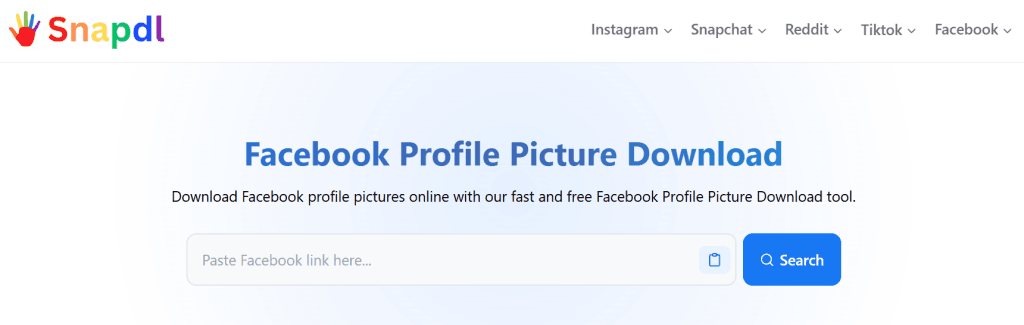
How to Use the Facebook Profile Picture Download Tool
Using the Facebook Profile Picture Download tool is quick and simple. You can view and download publicly available Facebook profile pictures in just a few steps. Follow the instructions below to use the tool.
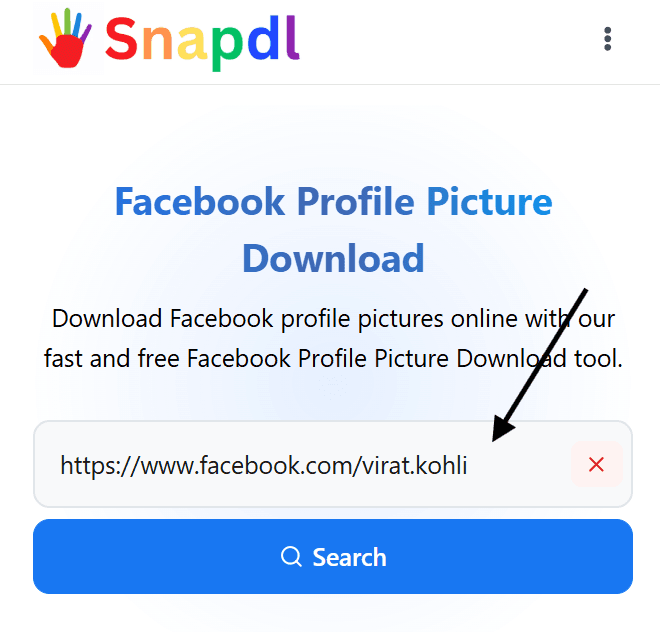
Step 1
Paste the Facebook Profile Link
Copy the Facebook profile URL and paste it into the search box.
Step 2
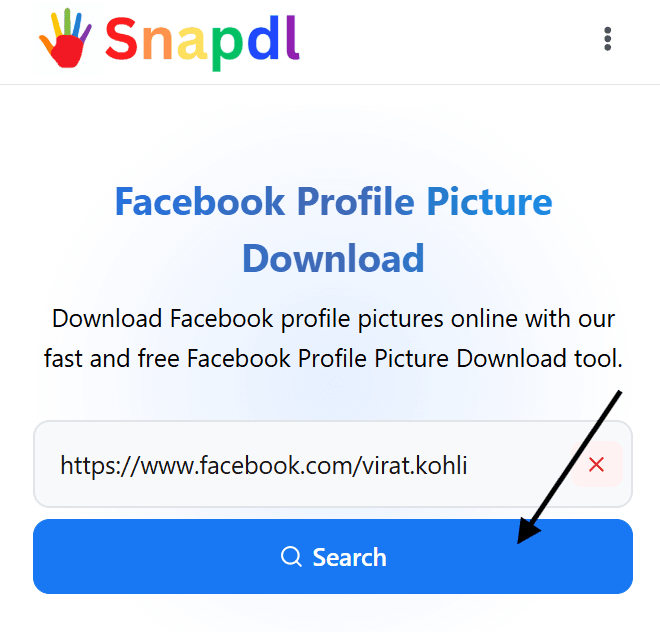
Click the Search Button
After entering the profile URL, click the Search button. The tool will scan the link and display the available Facebook profile picture for preview.
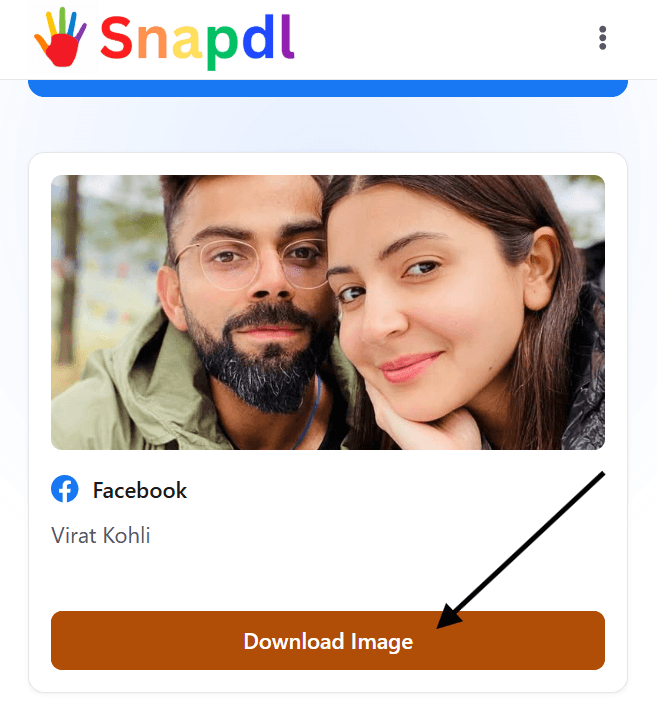
Step 3
Click the Download Image Button
Once the profile picture appears, click the Download Image button to save the image to your device. The download will start instantly with the best available image quality.
Best Facebook Profile Picture Downloader of 2026
Finding a reliable Facebook Profile Picture Downloader should not be complicated. Our tool makes Facebook profile picture download quick and easy by allowing you to paste a profile link, view the available image, and save it in just a few clicks.
Whether you want to download Facebook profile picture images from a public profile or simply view a larger version before saving it, the tool is designed to provide a smooth experience on both desktop and mobile devices.
Unlike many online tools, there is no software to install and no account registration required. Simply enter the Facebook profile URL, let the tool fetch the available image, and download the Facebook profile picture instantly.
For users looking for a fast, secure, and easy-to-use solution in 2026, this Facebook Profile Picture Downloader offers a straightforward way to save publicly available profile images online.
More Tools: TikTok Profile Picture Downloader
Key Features of Snapdl Facebook Profile Picture Download Tool
Fast Profile Picture Download
Download publicly available Facebook profile pictures quickly without extra steps.
No Login Required
Use the tool without signing in to Facebook or creating an account.
Free to Use
Download available profile images online without any paid plan.
Mobile-Friendly Tool
Use the downloader easily on mobile, tablet, or desktop.
Image Preview Option
View the available Facebook profile picture before downloading it.
Public Images Only
The tool works only with publicly available Facebook profile pictures.
Is Facebook Profile Picture Download Safe?
Yes, using a Facebook Profile Picture Download tool is generally safe when it is designed to work only with publicly available profile pictures. Our tool does not require you to log in with your Facebook account, install software, or provide personal information.
To download a profile picture, simply paste the Facebook profile URL into the tool and let it retrieve the available image. This process helps keep the experience simple while reducing the need to share sensitive account details.
It’s important to note that this tool only works with public profile pictures and respects Facebook’s privacy settings. Private, restricted, or hidden profile photos cannot be accessed or downloaded through the tool.
Whether you’re using a desktop, tablet, or mobile device, the Facebook Profile Picture Download tool provides a convenient way to view and save publicly available profile images online.
Must Try: Snapchat Viewer
Why Use a Facebook Profile Picture Download Tool?
A Facebook Profile Picture Download tool saves time when you need a clean copy of a profile image. Instead of taking a low-quality screenshot, you can paste the profile link and download the available picture directly.
It is useful for saving your own Facebook display photo, checking how a profile image looks in a larger view, or keeping a clear image for personal reference. The process is simple and works from any device, including mobile, tablet, and desktop.
This Facebook picture downloader is made for quick access, clean preview, and easy image saving. Just enter the profile URL, search for the image, and download the Facebook profile picture in a few clicks.
If you want to view Instagram profiles anonymously, you may give Instagram Private Viewer a try.
Other Snapdl Tools
Instragram Profile Viewer
Browse public Instagram profiles privately without logging into your Instagram account.
Instagram Private Viewer
Browse private Instagram profiles privately without logging into your Instagram account.
Facebook Reel Downloader
Download Facebook Reels videos, MP3 audio, and thumbnails online without installing any app or creating an account.
Snapchat Story Viewer
View Snapchat profiles and stories anonymously online without logging in, installing an app, or creating an account.
Snapchat Video Downloader
Easily download Snapchat videos and stories in high quality with no login required.
Legal Disclaimer and Responsible Use
This Facebook Profile Picture Download tool is made for downloading publicly available Facebook profile pictures only. Users are responsible for making sure they have the right to view, save, or use any image they download.
We do not host Facebook images on our server, and we are not connected with Facebook or Meta. All trademarks, logos, and brand names belong to their respective owners.
Please use this tool for personal and lawful purposes only. Do not use downloaded images for impersonation, harassment, copyright violation, or any activity that may break Facebook’s terms or someone else’s rights.